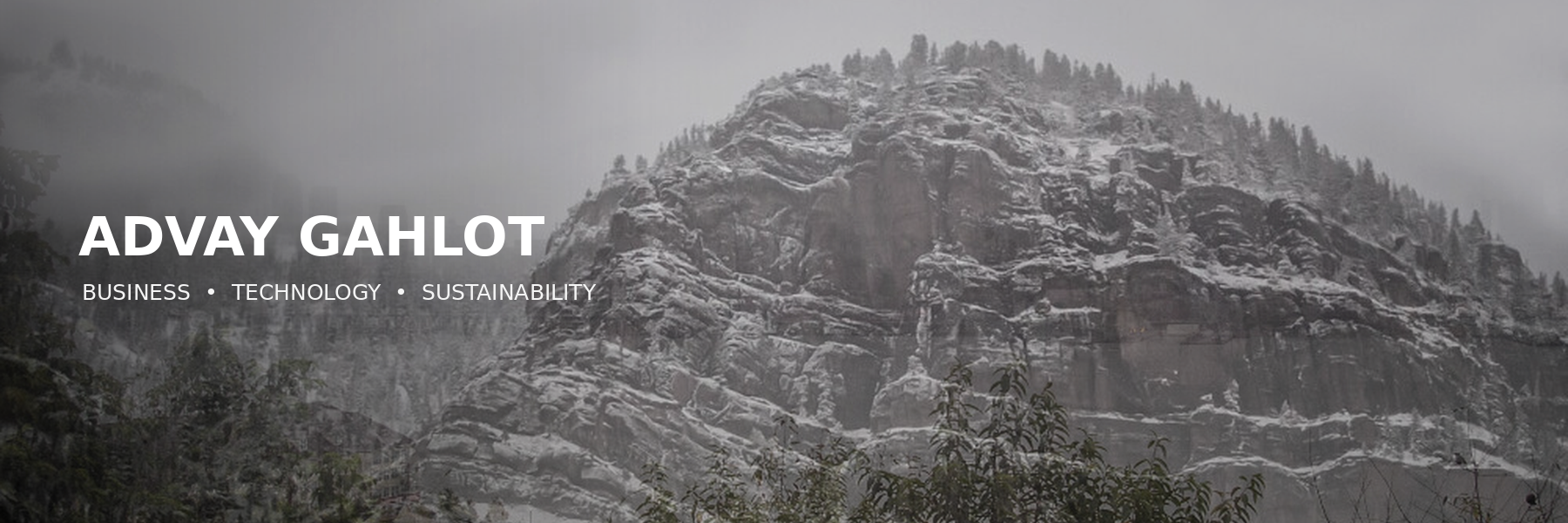
For my website header, I wanted one image that shows the main ideas behind my site. My website focuses on my life as a Rutgers student, my professional goals, and my interests in business, technology, sustainability, and real estate. I combined a mountain and forest image with the New York City skyline. The forest represents sustainability and my interest in environmental issues. The skyline represents business, technology, management, and real estate, but it also represents my personal goal to reach greater heights in my education and career. When you visit my website, I want you to understand that I care about growth, progress, and building something meaningful. The mix of nature and a city also matches the environmental theme I use throughout my website.
I found both source images through Wikimedia Commons. I used “Forest on a mountain in Ouray” by Nathan Anderson as the main background. I also used “New York City skyline views from Union City, New Jersey” by The Eloquent Peasant. Both pages list the images under the Creative Commons CC0 1.0 license. This license allows you to copy, modify, and reuse the images. I checked the original source pages and their licenses before using them instead of assuming that any image online was free to use (Anderson, Wikimedia Commons, CC0 1.0; The Eloquent Peasant, Wikimedia Commons, CC0 1.0). The course guide also explains that you should check the license and save the original source information when you use an image (Hodges, “Part 1: Review Preliminary Knowledge”).
I created the header by working with multiple layers. I used the forest as the background layer and placed the city skyline over it as another layer. I lowered the transparency of the skyline so you can still see the forest behind it. I also adjusted the brightness, color, and contrast so the two images looked more connected. I added my name and the words “Business, Technology, Sustainability” on top. Manovich explains that layers let you work with separate parts of an image without changing everything else. He explains that an image can change from one whole object into “a composite of separate parts” (Manovich, “The Layers Menu”). That matches my process because I changed the skyline, background, and text separately before combining them into one final header.
My process differs from the single layer bitmap style Davison describes when discussing MS Paint. Davison explains that MS Paint creates images through a grid of pixels and uses a small set of mouse controlled tools (Davison, p. 276). With a basic bitmap image, you work more directly with the pixels on one image surface. My header gave me more control because I kept each part on a separate layer. I could move the skyline, change its transparency, adjust the background, and edit the text without changing every other part. Both processes involve editing digital images, but layers made it easier for me to experiment and control the final design.
Image Sources
“Forest on a mountain in Ouray,” photograph by Nathan Anderson, Wikimedia Commons, Creative Commons CC0 1.0.
https://commons.wikimedia.org/wiki/File:Forest_on_a_mountain_in_Ouray_(Unsplash).jpg?
“New York City skyline views from Union City, New Jersey,” photograph by The Eloquent Peasant, Wikimedia Commons, Creative Commons CC0 1.0.
https://commons.wikimedia.org/wiki/File:New_York_City_skyline_views_from_Union_City,_New_Jersey_03.jpg?